<rss xmlns:dc="http://purl.org/dc/elements/1.1/" xmlns:content="http://purl.org/rss/1.0/modules/content/" xmlns:atom="http://www.w3.org/2005/Atom" version="2.0">
  <channel>
    <title><![CDATA[ JBang ]]></title>
    <description><![CDATA[  ]]></description>
    <link>http://www.jbang.dev/</link>
    <generator>Quarkus Roq</generator>
    <lastBuildDate>2025-10-17T00:00Z[Etc/UTC]</lastBuildDate>
      <item>
        <title><![CDATA[Java in Places You Do Not Expect It]]></title>
        <link>http://www.jbang.dev/learn/java-in-places-you-do-not-expect-it/</link>
        <guid isPermaLink="false">http://www.jbang.dev/learn/java-in-places-you-do-not-expect-it/</guid>
        <pubDate>2025-10-17T00:00Z[Etc/UTC]</pubDate>
        <content:encoded><![CDATA[<div class="paragraph">
<p>JBang is about making Java something you can edit, build, run, deploy and share with minimum ceremony and optimally zero friction. This is a work in progress, and this week I feel we got a big step closer to the ultimate goal. Best way to show this? Just try it yourself - it takes 5 seconds.</p>
</div>
<div class="sect1">
<h2 id="_try_java_in_your_browser">Try Java in your browser</h2>
<div class="sectionbody">
<div class="paragraph">
<p>Click this link → <a href="/try/?repo=https%3A%2F%2Fgithub.com%2Fjbangdev%2Fjbang-jupyter-examples&amp;filepath=hibernate.ipynb&amp;redirect=3">Run Java in your browser</a> - wait a moment and you have a running Java environment,
showing Hibernate example in your browser. No JDK or IDE to install, no account, just works.</p>
</div>
<div class="imageblock">
<div class="content">
<img src="/assets/images/hibernateipynb.gif" alt="Java in your browser">
</div>
</div>
<div class="paragraph">
<p>Or scroll down and click "Activate" below to run Java code right here in this blog post:</p>
</div>
<!-- Configure and load Thebe - must be before the thbe js is loaded !-->
<script type="text/x-thebe-config">
  {
        requestKernel: true,
        persistKernel: false,
        useJupyterLite: false,
        useBinder: true,
        binderOptions: {
          repo: "jupyter-java/jupyter-java-binder",
          ref: "jbang",
          binderUrl: 'https://mybinder.org'
        },
        kernelOptions: {
          kernelName: "jbang",
        },
        codeMirrorConfig: {

        }
      }
</script>

<script src="https://unpkg.com/thebe@0.9.3/lib/index.js"></script>
<link rel="stylesheet" href="https://unpkg.com/thebe@0.9.3/lib/thebe.css">
<div class="thebe-activate"></div>
<div class="thebe-status"></div>
<div class="listingblock">
  <div class="content">
    <pre class="highlight hljs-copy-wrapper">
      <code class="language-java hljs" data-lang="java" data-executable="true">
//DEPS io.jeamlit:jeamlit:0.46.0
//DEPS ch.qos.logback:logback-classic:1.5.19

import org.icepear.echarts.Bar;
import io.jeamlit.core.Nb;
import io.jeamlit.core.Jt;

// only need to run this once - jeamlit shared CSS and web components
display(Nb.getInitHtml(), "text/html");

// some chart
Bar bar = new Bar()
        .setLegend()
        .setTooltip("item")
        .addXAxis(new String[] { "Matcha Latte", "Milk Tea", "Cheese Cocoa", "Walnut Brownie" })
        .addYAxis()
        .addSeries("2015", new Number[] { 43.3, 83.1, 86.4, 72.4 })
        .addSeries("2016", new Number[] { 85.8, 73.4, 65.2, 53.9 })
        .addSeries("2017", new Number[] { 93.7, 55.1, 82.5, 39.1 });

display(Nb.render(Jt.echarts(bar).build()), "text/html");
      </code>
    </pre>
  </div>
</div>
<div class="paragraph">
<p>That is real Java. With real Maven dependencies. Output rendered in your browser with no additional install.</p>
</div>
<div class="paragraph">
<p>For those curious - above is using <a href="https://github.com/jeamlit/jeamlit">Jeamlit</a> to render the chart in your browser. It should look something like this:</p>
</div>
<div class="imageblock">
<div class="content">
<img src="/assets/images/jeamlit-barchart.png" alt="Jeamlit">
</div>
</div>
<div class="paragraph">
<p>Jeamlit is a new library similar to Streamlit for Python, not done by us but inspired by JBang that allows building interactive web apps in Java with zero friction - do <a href="https://jeamlit.io/">check it out</a>!</p>
</div>
</div>
</div>
<div class="sect1">
<h2 id="_what_was_made">What was made</h2>
<div class="sectionbody">
<div class="paragraph">
<p>I&#8217;ve been wanting to use <code>//DEPS</code> in Jupyter Notebooks for a long time, but it has been a pain to set up, so I
talked with maintainers of <a href="https://github.com/dflib/jjava">JJava</a> and <a href="https://github.com/padreati/rapaio-jupyter-kernel">Rapaio</a> kernels and explored options. Each has their own way of dealing with dependencies - and I prefer to minimize the friction thus I created a JJava derived kernel that supports <code>//DEPS</code> directives in notebooks.</p>
</div>
<div class="paragraph">
<p>And in doing so I discovered that we could use Python&#8217;s existing infrastructure (Jupyter Notebooks, MyBinder and Thebe) to go some steps further.</p>
</div>
<div class="paragraph">
<p>There is a shockingly small amount of code to make this all work - and its in its infancy still; there is a lot more one can do with this -
and I&#8217;m hoping you all will help make it better to make Java something you can share and use with zero friction.</p>
</div>
<div class="paragraph">
<p>Here&#8217;s what we&#8217;ve built:</p>
</div>
<div class="ulist">
<ul>
<li>
<p>Created a custom <a href="https://github.com/jbangdev/jbang-jupyter">JBang Jupyter kernel</a> that supports <code>//DEPS</code> directives in notebooks, based on JJava kernel</p>
</li>
<li>
<p>Built a <a href="https://github.com/jupyter-java/jupyter-java-binder">Binder environment</a> for running Java kernels in your browser with no install</p>
</li>
<li>
<p>Developed <a href="https://github.com/jbangdev/jbang-jupyter-runner">jbang-jupyter-runner</a> extension to run .java/.jsh files directly in Jupyter Lab</p>
</li>
</ul>
</div>
<div class="paragraph">
<p>Put it all together and you have a way to run Java code in your browser with no additional install.</p>
</div>
<div class="paragraph">
<p><strong>Note:</strong> This is not just for browser-based notebooks - it also works in IntelliJ, VSCode, Cursor and other IDEs that support Jupyter Notebooks.</p>
</div>
</div>
</div>
<div class="sect1">
<h2 id="_how_to_try_it">How to Try It</h2>
<div class="sectionbody">
<div class="paragraph">
<p>The fastest way is our new <a href="/try/">jbang.dev/try</a> page.</p>
</div>
<div class="paragraph">
<p><strong>In your browser (no install):</strong></p>
</div>
<div class="ulist">
<ul>
<li>
<p>Click <a href="/try/?repo=https%3A%2F%2Fgithub.com%2Fjbangdev%2Fjbang-jupyter-examples&amp;filepath=hibernate.ipynb">this Hibernate example</a></p>
</li>
<li>
<p>Try <a href="/try/?code=IO.println%28%22Hello%20from%20JBang%21%22%29%3B">custom code</a></p>
</li>
<li>
<p>Build <a href="/try/custom/">your own shareable links</a> for your repositories</p>
</li>
</ul>
</div>
<div class="paragraph">
<p><strong>Locally (with Jupyter):</strong></p>
</div>
<div class="listingblock">
<div class="content">
<pre class="highlight"><code class="language-bash" data-lang="bash">jbang install-kernel@jupyter-java --java 25 --enable-preview jbang</code></pre>
</div>
</div>
<div class="paragraph">
<p>Works in IntelliJ, VSCode, Cursor, and any IDE with Jupyter support! If not - let us know!</p>
</div>
</div>
</div>
<div class="sect1">
<h2 id="_what_this_unlocks">What This Unlocks</h2>
<div class="sectionbody">
<div class="paragraph">
<p><strong>Instant workshops</strong> — A browser tab replaces a 45-minute install session.</p>
</div>
<div class="paragraph">
<p><strong>Runnable documentation</strong> — Stop making readers imagine the output. Let them press Run.</p>
</div>
<div class="paragraph">
<p><strong>Shareable bug reproductions</strong> — "Can you reproduce this?" becomes a link, not a setup guide.</p>
</div>
<div class="paragraph">
<p><strong>API exploration</strong> — Test a library with <code>//DEPS</code>, not <code>pom.xml</code>.</p>
</div>
<div class="paragraph">
<p>This is not about data science or competing with Python.</p>
</div>
<div class="paragraph">
<p>This is about making Java something you can share with zero friction — all in line with JBang&#8217;s mission.</p>
</div>
</div>
</div>
<div class="sect1">
<h2 id="_try_it_now">Try It Now</h2>
<div class="sectionbody">
<div class="paragraph">
<p>Ready to experience zero-friction Java?</p>
</div>
<div class="paragraph">
<p><strong>Get started:</strong></p>
</div>
<div class="ulist">
<ul>
<li>
<p>Try the <a href="/try/">interactive demo</a> right now - multiple samples available</p>
</li>
<li>
<p>Click <a href="/try/?repo=https%3A%2F%2Fgithub.com%2Fjbangdev%2Fjbang-jupyter-examples&amp;filepath=hibernate.ipynb&amp;redirect=3">this Hibernate example</a> to see it in action</p>
</li>
<li>
<p>Create <a href="/try/custom/">custom shareable links</a> for your own projects</p>
</li>
<li>
<p>Install locally: <code>jbang install-kernel@jupyter-java --java 25 --enable-preview jbang</code></p>
</li>
</ul>
</div>
<div class="paragraph">
<p>This is still new and evolving - we have more ideas and plans for this, so stay tuned!</p>
</div>
<div class="paragraph">
<p>This is about making Java something you can share with zero friction — all in line with JBang&#8217;s mission.</p>
</div>
<div class="paragraph">
<p>Enjoy!</p>
</div>
</div>
</div>]]></content:encoded>
      </item>
      <item>
        <title><![CDATA[Introducing jbang-fmt]]></title>
        <link>http://www.jbang.dev/learn/introducing-jbang-fmt/</link>
        <guid isPermaLink="false">http://www.jbang.dev/learn/introducing-jbang-fmt/</guid>
        <pubDate>2025-09-14T00:00Z[Etc/UTC]</pubDate>
        <content:encoded><![CDATA[<div class="paragraph">
<p>I really did not want to do this, but after I and others tried to convince google-java-format <a href="https://github.com/google/google-java-format/issues/1218">one</a> <a href="https://github.com/google/google-java-format/issues/1218">too</a> <a href="https://github.com/google/google-java-format/issues/1215">many</a> times to not mess with JBang directives like <code>//DEPS</code> or the <code>///usr/bin/env</code> lines, I finally gave up and made my own.</p>
</div>
<div class="paragraph">
<p>While I&#8217;m a fan of tools like Spotless, their command-line usage is still too cumbersome. This prompted me to create an improved solution called jbang-fmt, in the hope that its key features will be adopted by competing programs and ultimately render itself obsolete</p>
</div>
<div class="paragraph">
<p>So here it is: <a href="https://github.com/jbangdev/jbang-fmt" class="bare">https://github.com/jbangdev/jbang-fmt</a></p>
</div>
<div class="paragraph">
<p>I would have called it <code>java-fmt</code> as it is not tied to JBang -  you can use it as-is with any Java code; but I don&#8217;t like visits from lawyers.</p>
</div>
<div class="paragraph">
<p><span class="image"><img src="https://raw.githubusercontent.com/jbangdev/jbang-fmt/main/images/jbang-fmt.png" alt="jbang fmt" width="50%"></span></p>
</div>
<div class="sect1">
<h2 id="_why_jbang_fmt">Why jbang-fmt?</h2>
<div class="sectionbody">
<div class="ulist">
<ul>
<li>
<p><strong>Simple</strong>: One command to format any Java file or directory</p>
</li>
<li>
<p><strong>Fast</strong>: Built for command-line usage and using virtual threads</p>
</li>
<li>
<p><strong>Flexible</strong>: All the options you need (but probably shouldn&#8217;t use)</p>
</li>
<li>
<p><strong>JBang-aware</strong>: Respects <code>//DEPS</code> and <code>///usr/bin/env</code> directives</p>
</li>
</ul>
</div>
<div class="paragraph">
<p>It is a simple tool that formats Java code using Eclipse Formatter!<sup class="footnote">[<a id="_footnoteref_1" class="footnote" href="#_footnotedef_1" title="View footnote.">1</a>]</sup> but by default does not mess with JBang directives like <code>//DEPS</code> or the <code>///usr/bin/env</code> lines.</p>
</div>
<div class="paragraph">
<p>In its simplest form you just do:</p>
</div>
<div class="paragraph">
<p><code>jbang-fmt .</code></p>
</div>
<div class="paragraph">
<p>And it will format all the Java files recursively in the current directory.</p>
</div>
<div class="paragraph">
<p>If you want to format specific set of files and directories you can do:</p>
</div>
<div class="paragraph">
<p><code>jbang-fmt myscript.java src/main</code></p>
</div>
<div class="paragraph">
<p>That&#8217;s it - you don&#8217;t need to read more, just install it and use it.</p>
</div>
</div>
</div>
<div class="sect1">
<h2 id="_installation">Installation</h2>
<div class="sectionbody">
<div class="paragraph">
<p><code>jbang app install jbang-fmt@jbangdev</code></p>
</div>
</div>
</div>
<div class="sect1">
<h2 id="_one_more_thing">One more thing&#8230;&#8203;</h2>
<div class="sectionbody">
<div class="paragraph">
<p>Since I made this in like 30 minutes as I was being <a href="https://github.com/jbangdev/jbang/pull/2205/">nerd sniped</a> I couldn&#8217;t resist adding a few more bell and whistles.</p>
</div>
<div class="paragraph">
<p>Before I show them - please know - that I really highly recommend you use <strong>one</strong> format in your project and in many ways I fully agree with <a href="https://github.com/google/google-java-format/wiki/FAQ#i-just-need-to-configure-it-a-bit-differently-how">google-java-format faq</a> on locking down the formatting rules.</p>
</div>
<div class="paragraph">
<p>That said - the world is a messy place and we all have different needs - so I like to make formatting easy to do and enable easy experimentation - so I added all the ways I can think of a simple formatting tool could be useful.</p>
</div>
<div class="sect2">
<h3 id="_check"><code>--check</code></h3>
<div class="paragraph">
<p>This is a really simple flag that will check if the code is formatted without making any changes.</p>
</div>
<div class="paragraph">
<p><code>jbang-fmt --check .</code></p>
</div>
<div class="paragraph">
<p>If the code is not formatted it will exit with a non-zero code. Useful in CI pipelines to fail the build if the code is not formatted and as git pre-commit hooks - see <a href="https://github.com/jbangdev/jbang-fmt/?tab=readme-ov-file#git-integration">Git Integration</a> for an example of the latter.</p>
</div>
</div>
<div class="sect2">
<h3 id="_maven_and_gradle_integration">Maven and Gradle integration</h3>
<div class="paragraph">
<p>You can use it from Maven and Gradle using their jbang support - no additional plugins needed. See <a href="https://github.com/jbangdev/jbang-fmt?tab=readme-ov-file#maven-integration">Maven</a> and <a href="https://github.com/jbangdev/jbang-fmt?tab=readme-ov-file#gradle-integration">Gradle</a> in documentation for more details.</p>
</div>
</div>
<div class="sect2">
<h3 id="_shortcuts_for_common_debates">Shortcuts for common "debates"</h3>
<div class="ulist">
<ul>
<li>
<p><strong>Tabs vs spaces?</strong> Use <code>--indent-with=tab</code> or <code>--indent-with=space</code></p>
</li>
<li>
<p><strong>Big vs small monitor?</strong> Use <code>--line-length=120</code> or <code>--line-length=40</code></p>
</li>
<li>
<p><strong>Java version nostalgia?</strong> Use <code>--java-version=4</code> for the good old days or <code>--java-version=25</code> for living on the edge</p>
</li>
<li>
<p><strong>Compact docs?</strong> Use <code>--indent-size=2</code>
etc.</p>
</li>
</ul>
</div>
<div class="paragraph">
<p>&#8230;&#8203;and if you want full control you can use <code>-Skey=val</code> to override any Eclipse formatter property.</p>
</div>
<div class="paragraph">
<p>But again, remember I told you to just use one format - above is not meant to be used unless you are ready for war.</p>
</div>
<div class="paragraph">
<p>In addition it also supports using @-files in case you ignored my advice and want to go crazy on shared formatting.</p>
</div>
</div>
<div class="sect2">
<h3 id="_conclusion">Conclusion</h3>
<div class="paragraph">
<p>So - what are you waiting for? Install it and start formatting your code today!</p>
</div>
<div class="paragraph">
<p>And if you have any feedback, suggestions, or want to contribute, please open an issue on <a href="https://github.com/jbangdev/jbang-fmt/issues">GitHub</a>!</p>
</div>
</div>
</div>
</div>
<div id="footnotes">
<hr>
<div class="footnote" id="_footnotedef_1">
<a href="#_footnoteref_1">1</a>. I wanted to offer both Google Java Format and Eclipse but Google Java Format even on API level <a href="https://github.com/google/google-java-format/issues/1276">seems to have</a> no consistent ability to ignore lines.
</div>
</div>]]></content:encoded>
      </item>
      <item>
        <title><![CDATA[Manifest Tool]]></title>
        <link>http://www.jbang.dev/learn/manifest-tool/</link>
        <guid isPermaLink="false">http://www.jbang.dev/learn/manifest-tool/</guid>
        <pubDate>2025-08-03T00:00Z[Etc/UTC]</pubDate>
        <content:encoded><![CDATA[<div class="paragraph">
<p>Say hello to <code>mf@jbangdev</code> — the new, delightfully simple way to peek inside any JAR’s manifest!</p>
</div>
<div class="paragraph">
<p>Ever wondered what secrets lurk in <code>META-INF/MANIFEST.MF</code>? Tired of squinting at cryptic key-value pairs or wrangling with unzip just to see what&#8217;s inside? Now you can summon manifest magic with a single command:</p>
</div>
<div class="listingblock">
<div class="content">
<pre class="highlight"><code class="language-bash" data-lang="bash">mf `jbang info jar com.h2database:h2:2.2.224`</code></pre>
</div>
</div>
<div class="paragraph">
<p>This will use <code>jbang</code> to fetch the jar for h2 and then use <code>mf</code> to print the manifest.</p>
</div>
<div class="listingblock">
<div class="content">
<pre class="highlight"><code>Manifest-Version: 1.0
Implementation-Title: H2 Database Engine
Implementation-URL: https://h2database.com
Implementation-Version: 2.2.224
Build-Jdk: 1.8
Created-By: 1.8.0_281-b09 (Oracle Corporation)
Main-Class: org.h2.tools.Console
Automatic-Module-Name: com.h2database
Bundle-Activator: org.h2.util.DbDriverActivator
Bundle-ManifestVersion: 2
Bundle-Name: H2 Database Engine
Bundle-SymbolicName: com.h2database
Bundle-Vendor: H2 Group
Bundle-Version: 2.2.224
Bundle-License: https://h2database.com/html/license.html
Bundle-Category: jdbc
Multi-Release: true
Import-Package: javax.crypto,javax.crypto.spec,javax.management,javax.naming;resolution:=optional,javax.naming.directory;resolution:=optional,..
Export-Package: org.h2;version="2.2.224",org.h2.api;version="2.2.224",org.h2.constant;version="2.2.224",org.h2.fulltext;version="2.2.224"...
Provide-Capability: osgi.service;objectClass:List&lt;String&gt;=org.osgi.service.jdbc.DataSourceFactory
Premain-Class: org.h2.util.Profiler</code></pre>
</div>
</div>
<div class="sect1">
<h2 id="_installation">Installation</h2>
<div class="sectionbody">
<div class="paragraph">
<p>You can run it directly using <code>jbang mf@jbangdev</code> or install it using <code>jbang install mf@jbangdev</code> to get it as a standalone tool.</p>
</div>
</div>
</div>
<div class="sect1">
<h2 id="_structured_output">Structured output</h2>
<div class="sectionbody">
<div class="paragraph">
<p>You&#8217;ll notice keys like <code>Import-Package</code> and <code>Export-Package</code> are very long and hard to read. <code>mf</code> allows enabling structured output (<code>-s</code> or <code>--structured</code>) that supports certain well-known keys and when enabled will print the values as lists or maps.</p>
</div>
<div class="listingblock">
<div class="content">
<pre class="highlight"><code class="language-console" data-lang="console">mf `jbang info jar com.h2database:h2:2.2.224` -s</code></pre>
</div>
</div>
<div class="listingblock">
<div class="content">
<pre class="highlight"><code class="language-bash" data-lang="bash">Manifest-Version: 1.0
Implementation-Title: H2 Database Engine
...
Import-Package:
  javax.crypto: true
  javax.crypto.spec: true
  javax.management: true
  javax.naming:
    resolution: optional
  javax.naming.directory:
    resolution: optional
  javax.naming.spi:
    resolution: optional
  ...
Export-Package:
  org.h2:
    version: 2.2.224
  org.h2.api:
    version: 2.2.224
  org.h2.constant:
    version: 2.2.224
  org.h2.fulltext:
    version: 2.2.224
...
Provide-Capability: osgi.service;objectClass:List&lt;String&gt;=org.osgi.service.jdbc.DataSourceFactory
Premain-Class: org.h2.util.Profiler</code></pre>
</div>
</div>
<div class="paragraph">
<p>Still long, but much easier to read.</p>
</div>
</div>
</div>
<div class="sect1">
<h2 id="_filtering">Filtering</h2>
<div class="sectionbody">
<div class="paragraph">
<p><code>mf</code> supports filtering the manifest keys using a regex.</p>
</div>
<div class="paragraph">
<p>In its simplest form it lets you substring on keys</p>
</div>
<div class="listingblock">
<div class="content">
<pre class="highlight"><code class="language-bash" data-lang="bash">mf `jbang info jar com.h2database:h2:2.2.224` -s version</code></pre>
</div>
</div>
<div class="listingblock">
<div class="content">
<pre class="highlight"><code class="language-bash" data-lang="bash">Manifest-Version: 1.0
Implementation-Version: 2.2.224
...</code></pre>
</div>
</div>
<div class="paragraph">
<p>but you can also use a regex to filter the keys.</p>
</div>
<div class="listingblock">
<div class="content">
<pre class="highlight"><code class="language-bash" data-lang="bash">mf `jbang info jar com.h2database:h2:2.2.224` "bundle|version"</code></pre>
</div>
</div>
<div class="listingblock">
<div class="content">
<pre class="highlight"><code class="language-bash" data-lang="bash">Manifest-Version: 1.0
Implementation-Version: 2.2.224
Bundle-Activator: org.h2.util.DbDriverActivator
Bundle-ManifestVersion: 2
Bundle-Name: H2 Database Engine
Bundle-SymbolicName: com.h2database
Bundle-Vendor: H2 Group
Bundle-Version: 2.2.224
Bundle-License: https://h2database.com/html/license.html
Bundle-Category: jdbc</code></pre>
</div>
</div>
</div>
</div>
<div class="sect1">
<h2 id="_json_yaml">JSON &amp; YAML</h2>
<div class="sectionbody">
<div class="paragraph">
<p>Finally, <code>mf</code> supports JSON(<code>--json</code>) and YAML(<code>--yaml</code>) output.</p>
</div>
<div class="listingblock">
<div class="content">
<pre class="highlight"><code class="language-bash" data-lang="bash">mf `jbang info jar com.h2database:h2:2.2.224` --json</code></pre>
</div>
</div>
<div class="paragraph">
<p>and they can be combined with the other options:</p>
</div>
<div class="listingblock">
<div class="content">
<pre class="highlight"><code class="language-bash" data-lang="bash">mf `jbang info jar com.h2database:h2:2.2.224` --yaml -s "version|package"</code></pre>
</div>
</div>
<div class="listingblock">
<div class="content">
<pre class="highlight"><code class="language-yaml" data-lang="yaml">Manifest-Version: "1.0"
Implementation-Version: "2.2.224"
Bundle-ManifestVersion: "2"
Bundle-Version: "2.2.224"
Import-Package:
  javax.crypto: true
  javax.crypto.spec: true
  javax.management: true
  javax.naming:
    resolution: "optional"
  javax.naming.directory:
    resolution: "optional"
  javax.naming.spi:
    resolution: "optional"
  javax.net: true
  javax.net.ssl: true
  javax.script:
    resolution: "optional"
  ...
Export-Package:
  org.h2:
    version: "2.2.224"
  org.h2.api:
    version: "2.2.224"
  org.h2.constant:
    version: "2.2.224"
  org.h2.fulltext:
    version: "2.2.224"
  org.h2.jdbc:
    version: "2.2.224"
  ...</code></pre>
</div>
</div>
</div>
</div>]]></content:encoded>
      </item>
      <item>
        <title><![CDATA[JBang moving into CommonHaus Foundation]]></title>
        <link>http://www.jbang.dev/learn/jbang-moving-into-commonhaus-foundation/</link>
        <guid isPermaLink="false">http://www.jbang.dev/learn/jbang-moving-into-commonhaus-foundation/</guid>
        <pubDate>2024-04-09T00:00Z[Etc/UTC]</pubDate>
        <content:encoded><![CDATA[<div class="paragraph">
<p>JBang and its associated projects is joining as a founding project of the <a href="https://www.commonhaus.org/">CommonHaus foundation</a>.</p>
</div>
<div class="imageblock">
<div class="content">
<img src="https://raw.githubusercontent.com/commonhaus/artwork/main/foundation/brand/svg/CF_icon_default.svg" alt="CF icon default" width="50%">
</div>
</div>
<div class="paragraph">
<p>CommonHaus is a brand-new foundation which focus is on providing an independent home for projects like JBang that are funded by independents and with room for project indivduality.</p>
</div>
<div class="paragraph">
<p>Other founding projects are <a href="https://in.relation.to/2024/04/09/hibernate-to-commonhaus/">Hibernate</a>, <a href="https://github.com/FasterXML/jackson">Jackson</a>, <a href="https://docs.openrewrite.org/">OpenRewrite</a>, <a href="https://andresalmiray.com/jreleaser-joins-commonhaus-foundation/">JReleaser</a> &amp; <a href="https://morphia.dev/">Morphia</a>.</p>
</div>
<div class="sect1">
<h2 id="_why_jbang_in_a_foundation">Why JBang in a foundation?</h2>
<div class="sectionbody">
<div class="paragraph">
<p>The decision to include JBang in a foundation stems from a desire to ensure its long-term sustainability and growth. Being part of a foundation, especially CommonHaus, provides JBang with a stable, independent home that supports its development and promotes collaboration. This move also opens up new opportunities for funding and contributions, further securing the project&#8217;s future and fostering an environment where JBang can thrive alongside other like minded open-source projects.</p>
</div>
</div>
</div>
<div class="sect1">
<h2 id="_why_commonhaus">Why CommonHaus?</h2>
<div class="sectionbody">
<div class="paragraph">
<p>The <a href="https://www.commonhaus.org/about/#our-guiding-principles">guiding principles</a> of CommonHaus summarizes it well:</p>
</div>
<div class="ulist">
<ul>
<li>
<p>Honor project and community identity</p>
</li>
<li>
<p>Offer guidance and support instead of imposing mandates</p>
</li>
<li>
<p>Maintain transparency in all of our actions</p>
</li>
<li>
<p>Encourage long-term thinking for sustained project impact</p>
</li>
</ul>
</div>
<div class="paragraph">
<p>These are important things for JBang - having a place to be hosted for ensuring continuity while still allowing individuality.</p>
</div>
</div>
</div>
<div class="sect1">
<h2 id="_what_does_it_mean_for_users">What does it mean for users?</h2>
<div class="sectionbody">
<div class="paragraph">
<p>JBang will stay JBang. If you as a user notice it has moved, I will be surprised.</p>
</div>
<div class="paragraph">
<p>Maybe the about text of the CLI will change; that is about it.</p>
</div>
</div>
</div>
<div class="sect1">
<h2 id="_what_does_it_mean_for_contributors">What does it mean for contributors?</h2>
<div class="sectionbody">
<div class="paragraph">
<p>The exact onboarding implication is still being defined, but it is expected to have minimal impact as we do most of the recommended things anyways.</p>
</div>
</div>
</div>
<div class="sect1">
<h2 id="_whats_next">What&#8217;s next?</h2>
<div class="sectionbody">
<div class="paragraph">
<p>Try out <a href="https://jbang.dev/downloads">JBang</a> if you haven&#8217;t already. If you see something that could need improvement or have a question, join the development on <a href="https://github.com/jbangdev">GitHub</a>, open issues and discussions, and let&#8217;s help make Java truly available to anyone.</p>
</div>
<div class="paragraph">
<p>Have fun!</p>
</div>
</div>
</div>]]></content:encoded>
      </item>
      <item>
        <title><![CDATA[Introducing jbanghub]]></title>
        <link>http://www.jbang.dev/learn/introducing-jbanghub/</link>
        <guid isPermaLink="false">http://www.jbang.dev/learn/introducing-jbanghub/</guid>
        <pubDate>2024-04-01T00:00Z[Etc/UTC]</pubDate>
        <content:encoded><![CDATA[<div class="paragraph">
<p>Today we are introducing <a href="https://github.com/jbanghub">JBangHub</a>!</p>
</div>
<div class="imageblock">
<div class="content">
<img src="/assets/images/jbanghublaunch.webp" alt="jbanghublaunch">
</div>
</div>
<div class="paragraph">
<p>JBang always allowed everyone easily make their own java/kotlin/groovy/etc. command line tools available in a jbang catalog. All it takes is that you make a jbang-catalog in your project, organization or website.</p>
</div>
<div class="paragraph">
<p>This is what makes things like <code>jbang jreleaser@jreleaser</code> and <code>jbang minecraft-server@microsoft</code> possible with minimal effort.</p>
</div>
<div class="paragraph">
<p>These can then be called as-is or even installed using <code>jbang app install</code> making them available in your PATH directly.</p>
</div>
<div class="paragraph">
<p>Many already added lots of catalogs and they are visible on the <a href="https://www.jbang.dev/appstore/">JBang AppStore</a>, readily available to be used from anywhere with JBang available.</p>
</div>
<div class="paragraph">
<p>This is anywhere you can run java including from <a href="https://www.jbang.dev/learn/jbang-npm/">javascript</a> and <a href="https://www.jbang.dev/learn/python-with-jbang/">python</a> - yes, even Jupyter Notebooks can access Java with JBang.</p>
</div>
<div class="paragraph">
<p>To make it even easier and make it possible for anyone to make their favourite tools available under a nice and simple name we are introducing <a href="https://github.com/jbangdev">JBangHub</a>, a GitHub organization where we invite everyone to contribute scripts and tools they would like to see easily available.</p>
</div>
<div class="paragraph">
<p>JBangHub is there to let anyone help any project become more easily accessible to the Java community.</p>
</div>
<div class="sect1">
<h2 id="_automatic_dependency_updates">Automatic dependency updates</h2>
<div class="sectionbody">
<div class="paragraph">
<p>We made a <code>jbang-catalog</code> template available that setups of a jbang-catalog with automatic renovate bot based updates.</p>
</div>
<div class="paragraph">
<p>All repos in JBangHub uses this to ensure any Maven referenced artifacts will get updates, but anyone can use this in their own jbang-catalog outside JBangHub too.</p>
</div>
<div class="paragraph">
<p>Just start it using <code>jbang init -t jbang-catalog &lt;reponame&gt;</code> and add aliases to your jbang-catalog.</p>
</div>
</div>
</div>
<div class="sect1">
<h2 id="_default_catalog">Default Catalog</h2>
<div class="sectionbody">
<div class="paragraph">
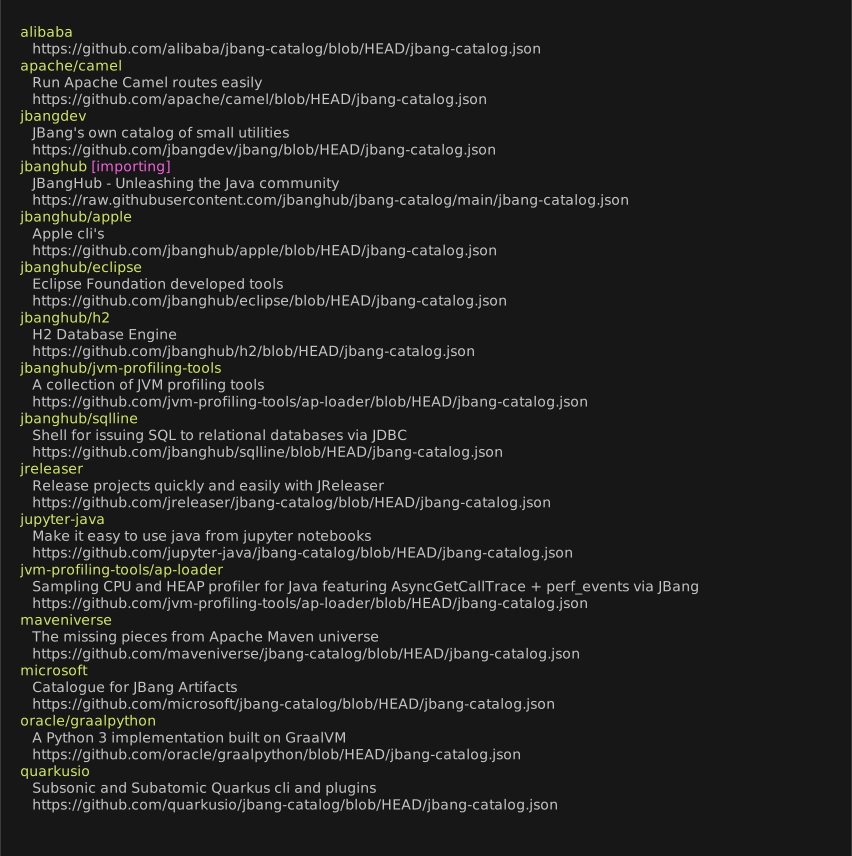
<p>The latest release (0.116) of JBang adds <code>jbanghub</code> as a default jbang catalog so when you do <code>jbang catalog list</code> you get something like:</p>
</div>
<div class="imageblock">
<div class="content">
<img src="/assets/images/jbangcataloglist.svg" alt="jbangcataloglist">
</div>
</div>
<div class="paragraph">
<p>This list is not intended to be <strong>every</strong> jbang-catalog on the planet - but more a teaser on what is available out there. We encourage and accept edits/updates to that list at <a href="https://github.com/jbanghub/jbang-catalog" class="bare">https://github.com/jbanghub/jbang-catalog</a>.</p>
</div>
</div>
</div>
<div class="sect1">
<h2 id="_help_expand">Help expand</h2>
<div class="sectionbody">
<div class="paragraph">
<p>Think something is missing - come contribute your favourite tool at <a href="https://github.com/jbanghub">JBangHub</a>.</p>
</div>
<div class="paragraph">
<p>Have fun!</p>
</div>
</div>
</div>]]></content:encoded>
      </item>
      <item>
        <title><![CDATA[jbang-python: Java in your Python]]></title>
        <link>http://www.jbang.dev/learn/jbang-python-java-in-your-python/</link>
        <guid isPermaLink="false">http://www.jbang.dev/learn/jbang-python-java-in-your-python/</guid>
        <pubDate>2023-09-11T00:00Z[Etc/UTC]</pubDate>
        <content:encoded><![CDATA[<div class="paragraph">
<p>Happy to announce <a href="https://github.com/jbangdev/jbang-python">jbang-python</a> - a pypi package which brings your Java to your Python project or notebook.</p>
</div>
<div class="paragraph text-center">
<p><span class="image"><img src="https://github.com/jbangdev/jbang-python/blob/main/python_jbang.png?raw=true" alt="python jbang" width="50%"></span></p>
</div>
<div class="paragraph">
<p><code>jbang-python</code> supports running any kind java code that JBang supports.</p>
</div>
<div class="paragraph">
<p>Wether that is a script from the <a href="https://jbang.dev/appstore">AppStore</a>, a Maven GAV, a jar or simply a java file stored in your project.</p>
</div>
<div class="sect1">
<h2 id="_example">Example</h2>
<div class="sectionbody">
<div class="paragraph">
<p>In your <code>requirements.txt</code> add:</p>
</div>
<div class="paragraph">
<p><code>jbang-python</code></p>
</div>
<div class="paragraph">
<p>or install it using <code>pip install jbang</code></p>
</div>
<div class="paragraph">
<p>Then in your python code you can do:</p>
</div>
<div class="listingblock">
<div class="content">
<pre class="highlight"><code class="language-javascript" data-lang="javascript">import jbang
output = jbang.exec('--java 21', 'properties@jbangdev', 'java').stdout
print(output)
output = jbang.exec('hello.java').stdout
print(output)</code></pre>
</div>
</div>
<div class="paragraph">
<p>With a <code>hello.java</code> that contains:</p>
</div>
<div class="listingblock">
<div class="content">
<pre class="highlight"><code class="language-java" data-lang="java">//DEPS com.github.lalyos:jfiglet:0.0.8

import com.github.lalyos.jfiglet.FigletFont;

class hello {

    public static void main(String... args) throws Exception {
        System.out.println(FigletFont.convertOneLine(
               "Hello " + ((args.length&gt;0)?args[0]:"jbang")));  ;;
    }
}</code></pre>
</div>
</div>
<div class="paragraph">
<p>When you run this it will automatically install JBang and Java if necessary and then run the requested alias and java code.</p>
</div>
<div class="paragraph">
<p>Besides using it in your python code locally you can also use it from Jupyter Notebooks.</p>
</div>
<div class="paragraph">
<p>The <code>jbang-python</code> package is available on <a href="https://pypi.org/project/jbang/">pypi</a> and the source code is available on <a href="https://github.com/jbangdev/jbang-python" class="bare">https://github.com/jbangdev/jbang-python</a>.</p>
</div>
<div class="paragraph">
<p>Have fun!</p>
</div>
</div>
</div>]]></content:encoded>
      </item>
      <item>
        <title><![CDATA[jbang-npm: Java Script in your JavaScript]]></title>
        <link>http://www.jbang.dev/learn/jbang-npm-java-script-in-your-javascript/</link>
        <guid isPermaLink="false">http://www.jbang.dev/learn/jbang-npm-java-script-in-your-javascript/</guid>
        <pubDate>2022-04-01T00:00Z[Etc/UTC]</pubDate>
        <content:encoded><![CDATA[<div class="paragraph">
<p>Today we are announcing <a href="https://github.com/jbangdev/jbang-npm">jbang-npm</a> a npm package which brings you Java Script to your JavaScript project.</p>
</div>
<div class="paragraph">
<p><code>jbang-npm</code> joins <code><a href="https://github.com/jbangdev/jbang-maven-plugin">jbang-maven</a></code> and <code><a href="https://github.com/jbangdev/jbang-gradle-plugin">jbang-gradle</a></code> as tools that brings the power of Java Script to your favourite build setup.</p>
</div>
<div class="paragraph text-center">
<p><span class="image"><img src="https://github.com/jbangdev/jbang-npm/raw/main/java_script.png" alt="java script" width="50%"></span></p>
</div>
<div class="paragraph">
<p><code>jbang-npm</code> supports running any kind java code that JBang supports.</p>
</div>
<div class="paragraph">
<p>Whether that is a script from the <a href="https://jbang.dev/appstore">AppStore</a>, a Maven GAV, a jar or simply a java file stored in your project.</p>
</div>
<div class="sect1">
<h2 id="_example">Example</h2>
<div class="sectionbody">
<div class="paragraph">
<p>Given you have a script name <code>test.js</code>:</p>
</div>
<div class="listingblock">
<div class="content">
<pre class="highlight"><code class="language-javascript" data-lang="javascript">#! /usr/bin/env node
const jbang = require('@jbangdev/jbang');
jbang.exec('--java 18', 'properties@jbangdev', 'java');
jbang.exec('hello.java', '"Java Script"')</code></pre>
</div>
</div>
<div class="paragraph">
<p>And in <code>package.json</code>:</p>
</div>
<div class="listingblock">
<div class="content">
<pre class="highlight"><code class="language-json" data-lang="json">{
  "scripts": {
    "test": "node test.js"
  },
  "devDependencies": {
    "@jbangdev/jbang": "^0.1.4"
  }
}</code></pre>
</div>
</div>
<div class="paragraph">
<p>With a <code>hello.java</code> that contains:</p>
</div>
<div class="listingblock">
<div class="content">
<pre class="highlight"><code class="language-java" data-lang="java">//DEPS com.github.lalyos:jfiglet:0.0.8

import com.github.lalyos.jfiglet.FigletFont;

class hello {

    public static void main(String... args) throws Exception {
        System.out.println(FigletFont.convertOneLine(
               "Hello " + ((args.length&gt;0)?args[0]:"jbang")));  ;;
    }
}</code></pre>
</div>
</div>
<div class="paragraph">
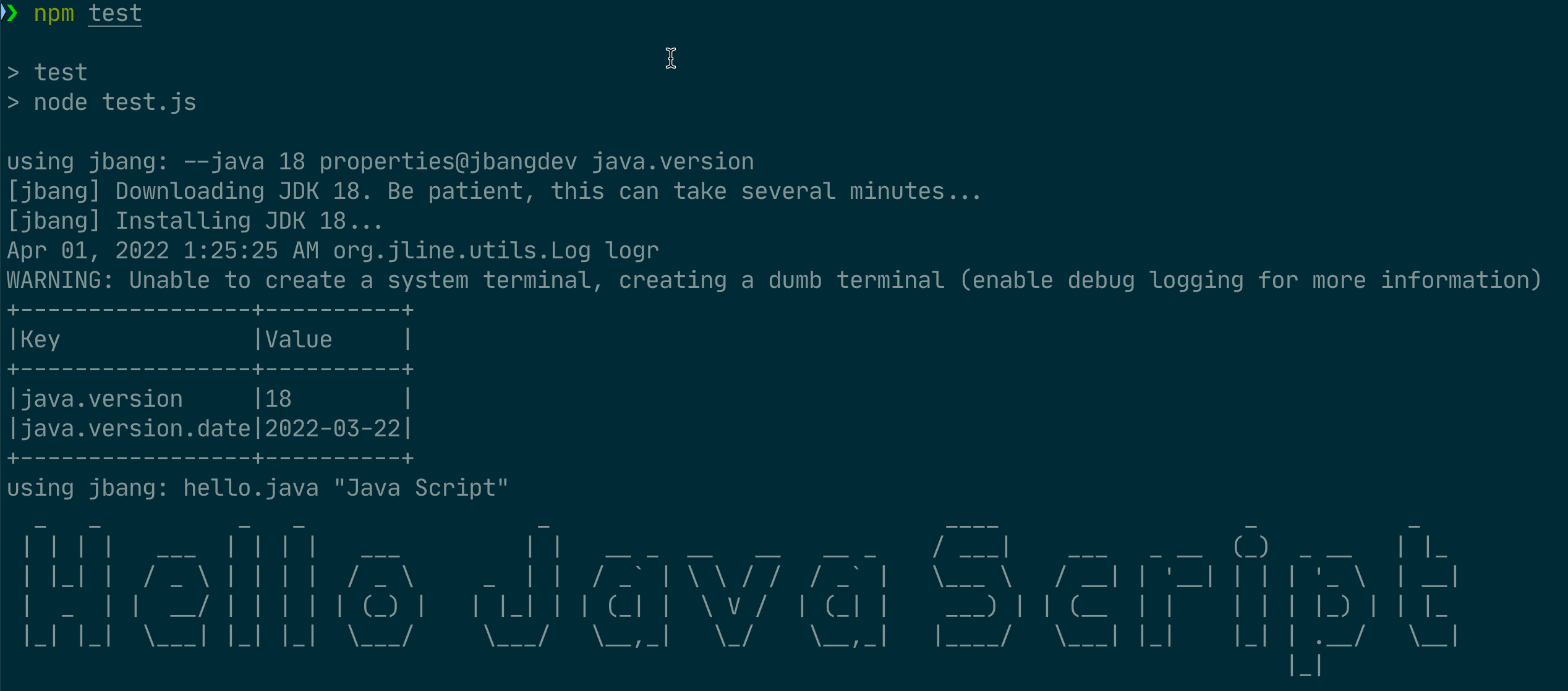
<p>When you run this using <code>npm run test</code> it will automatically install JBang and Java if necessary and you get an output like:</p>
</div>
<div class="imageblock">
<div class="content">
<img src="/assets/images/jbang-npm-output.png" alt="jbang npm output">
</div>
</div>
<div class="paragraph">
<p>In this case JBang was already installed but it did go transparently and downloaded Java 18 as one of the scripts was called with <code>--java 18</code>.</p>
</div>
<div class="paragraph">
<p>The opportunities are endless!</p>
</div>
<div class="paragraph">
<p><code>jbang-npm</code> was contributed by Peter Thomas and Pallafor Yodis from <a href="https://karatelabs.github.io/karate/">Karate</a> hall of fame.</p>
</div>
<div class="paragraph">
<p>Very much appreciated and looking forward to see what you make happen with Java Script in your JavaScript!</p>
</div>
<div class="paragraph">
<p>Have fun!</p>
</div>
</div>
</div>]]></content:encoded>
      </item>
      <item>
        <title><![CDATA[JBang Rewind 2021!]]></title>
        <link>http://www.jbang.dev/learn/jbang-rewind-2021/</link>
        <guid isPermaLink="false">http://www.jbang.dev/learn/jbang-rewind-2021/</guid>
        <pubDate>2022-01-03T00:00Z[Etc/UTC]</pubDate>
        <content:encoded><![CDATA[<div class="paragraph">
<p>We just closed on a very busy 2021 for JBang, and especially in the last few weeks, things progressed quite a bit. Therefore, I thought it would be nice to give a quick overview to recognize the progress and give you a chance to catch up!</p>
</div>
<div class="dlist">
<dl>
<dt class="hdlist1">December 31st</dt>
<dd>
<p><a href="https://www.jdoodle.com/try-jbang/">JDoodle</a> updates their iOS and Android versions to include JBang support. You can now edit and run Java/JBang on the go.</p>
</dd>
<dt class="hdlist1">December 29th</dt>
<dd>
<p><a href="https://www.baeldung.com/jbang-guide">Guide to JBang</a> posted on baeldung.com</p>
</dd>
<dt class="hdlist1">December 25th</dt>
<dd>
<p>Free IntelliJ License giveaway for one <a href="https://github.com/jbangdev/jbang/blob/main/CONTRIBUTORS.md">recognized JBang contributor</a> following the steps outlined <a href="https://github.com/jbangdev/jbang/discussions/1155">here</a>. It is a time of writing still open; thus, if you ever opened an issue, contributed an idea or code, or want to contribute, it is still possible to get it!</p>
</dd>
<dt class="hdlist1">December 22nd</dt>
<dd>
<p><a href="https://plugins.jetbrains.com/plugin/18257-jbang">IntelliJ Plugin</a> made available. Provides direct execution with JBang, content assist for <code>//DEPS</code> and other keywords, and more.</p>
</dd>
<dt class="hdlist1">December 1st</dt>
<dd>
<p>JBang was the <a href="https://www.javaadvent.com/2021/12/jbang-gift-that-keeps-on-giving.html">first entry</a> of 2021 Java Advent Calendar.</p>
</dd>
<dt class="hdlist1">November 29th</dt>
<dd>
<p>JDoodle added <a href="https://www.jdoodle.com/try-jbang/">JBang to its list of supported languages</a>. Making it possible to edit/write Java code using dependencies in a browser without login and additionally embed JBang examples in your blog/guides.</p>
</dd>
<dt class="hdlist1">November 24th</dt>
<dd>
<p>Microsoft made a <a href="https://github.com/microsoft/jbang-catalog">JBang catalog available</a> providing easy launch of Minecraft and Playwright CLI.</p>
</dd>
</dl>
</div>
<div class="paragraph">
<p>And in between, we had four releases of JBang in December with features and bug fixes - heading <a href="https://github.com/orgs/jbangdev/projects/2">towards the mythical 1.0</a> release.</p>
</div>
<div class="paragraph">
<p>The latest one is <a href="https://github.com/jbangdev/jbang/releases/tag/v0.86.0">0.86.0</a> which came on the second anniversary of JBang - or at least the <a href="https://twitter.com/maxandersen/status/1212714007301365761">first tweet</a> about it.</p>
</div>
<div class="paragraph">
<p>Here, one fix was how JBang deals with <code>lib</code> vs. <code>libs</code> that came from a conversation around using JBang in serverless lambda functions. Nándor Holozsnyák just made a <a href="https://dev.to/nandorholozsnyak/jbang-quarkus-aws-lambda-terraform-3-4ahk">blog</a> showing his explorations into this. I was happy to see this as Nandor looked into this because he felt JBang enabled a simple scripting approach comparable to Python/Node - but for Java.</p>
</div>
<div class="paragraph">
<p>That&#8217;s precisely what JBang is about - enabling easy use of Java - I&#8217;m expecting to see more enablement of using JBang for more than just scripts in 2022!</p>
</div>
<div class="paragraph">
<p>Here is to make 2022 about bringing JBang to version 1.0 and making Java fun!</p>
</div>]]></content:encoded>
      </item>
      <item>
        <title><![CDATA[JEP 408: Simple Web Server with JBang]]></title>
        <link>http://www.jbang.dev/learn/jep-408-simple-web-server-with-jbang/</link>
        <guid isPermaLink="false">http://www.jbang.dev/learn/jep-408-simple-web-server-with-jbang/</guid>
        <pubDate>2021-06-03T00:00Z[Etc/UTC]</pubDate>
        <content:encoded><![CDATA[<div class="paragraph">
<p>In March <a href="https://openjdk.java.net/jeps/408">JEP: 408: Simple Web Server</a> was announced. One of JEP 408&#8217;s goals is to make an easy to use web server available with Java using <code>java -m jdk.httpserver</code>.</p>
</div>
<div class="paragraph">
<p>It is a nice idea and I&#8217;m looking forward to see it happen.</p>
</div>
<div class="paragraph">
<p>That said - you do not need to wait for Java 18+ to get this. You can use <code>jbang httpd@jbangdev</code> today with Java 1.8 and upwards.</p>
</div>
<div class="paragraph">
<p>It is a <a href="https://github.com/jbangdev/jbang-catalog/blob/main/httpd.java">script</a> I wrote in a few hours after seeing <a href="https://twitter.com/sebi2706/status/1399966303625097217">yet another tweet</a> asking for a simple to use webserver. Like JEP 408 it only uses classes available in the JDK, meaning zero additonal download and setup besides <a href="https://jbang.dev/download">installing</a> <code>jbang</code>.</p>
</div>
<div class="paragraph">
<p>By default, <code>httpd@jbangdev</code> will serve the current directory on <a href="https://localhost:8000" class="bare">https://localhost:8000</a>.</p>
</div>
<div class="paragraph">
<p>Below is an example of using <code>httpd@jbangdev</code> to serve this website locally from its statically generated Jekyll <code>_site</code> folder on port 8080.</p>
</div>
<div class="listingblock">
<div class="content">
<pre class="highlight"><code class="language-shell" data-lang="shell">$ jbang httpd@jbangdev -p 8080 -d _site
[jbang] Building jar...
Serving HTTP on 0.0.0.0 port 8080 (http://0.0.0.0:8080/) from /Users/max/code/jbangdev/jbang-catalog/_site ...
127.0.0.1 - - [04/Jun/2021:00:50:36 +0200] "GET /" 200 -
127.0.0.1 - - [04/Jun/2021:00:50:36 +0200] "GET /assets/css/main.css" 200 -
127.0.0.1 - - [04/Jun/2021:00:50:36 +0200] "GET /assets/js/main.min.js" 200 -
127.0.0.1 - - [04/Jun/2021:00:50:36 +0200] "GET /assets/images/logo.png" 200 -
127.0.0.1 - - [04/Jun/2021:00:50:36 +0200] "GET /assets/images/carbon-deps.png" 200 -
127.0.0.1 - - [04/Jun/2021:00:50:36 +0200] "GET /assets/images/carbon-install.png" 200 -
127.0.0.1 - - [04/Jun/2021:00:50:36 +0200] "GET /assets/images/carbon-java.png" 200 -
127.0.0.1 - - [04/Jun/2021:00:50:36 +0200] "GET /assets/images/feature-ide.png" 200 -
127.0.0.1 - - [04/Jun/2021:00:50:36 +0200] "GET /assets/images/feature-version-juggle.svg" 200 -
127.0.0.1 - - [04/Jun/2021:00:50:36 +0200] "GET /assets/images/feature-appstore.png" 200 -
127.0.0.1 - - [04/Jun/2021:00:50:36 +0200] "GET /assets/images/slider/bg-1.jpg" 200 -</code></pre>
</div>
</div>
<div class="paragraph">
<p>As with any other <code>jbang</code> capable application you can also choose to install it in your <code>PATH</code> using <code>jbang app install http@jbangdev</code>. Once you do that you can run it from anywhere using just <code>httpd</code>.</p>
</div>
<div class="paragraph">
<p>In case you already have application called <code>httpd</code> you can use <code>--name</code> to give it a more unique name:</p>
</div>
<div class="listingblock">
<div class="content">
<pre class="highlight"><code class="language-shell" data-lang="shell">$ jbang app install --name jhttpd httpd@jbangdev
[jbang] Command installed: jhttpd
$ jhttpd
Serving HTTP on 0.0.0.0 port 8000 (http://0.0.0.0:8000/) from /Users/max/code/personal/jbangdev/jbang.dev ...</code></pre>
</div>
</div>
<div class="paragraph">
<p>Enjoy - and remember you can find <code>httpd@jbangdev</code> and other apps in <a href="https://jbang.dev/appstore">JBang AppStore</a>.</p>
</div>]]></content:encoded>
      </item>
      <item>
        <title><![CDATA[JBang Avatar]]></title>
        <link>http://www.jbang.dev/learn/jbang-avatar/</link>
        <guid isPermaLink="false">http://www.jbang.dev/learn/jbang-avatar/</guid>
        <pubDate>2020-12-01T00:00Z[Etc/UTC]</pubDate>
        <content:encoded><![CDATA[<div class="paragraph">
<p>It is getting very close to the first anniversary of first commit of JBang.</p>
</div>
<div class="paragraph">
<p>To celebrate I looked around to see what we could do and was reminded about good old <a href="https://gource.io">Gource</a>.</p>
</div>
<div class="paragraph">
<p>With Gource you can render the history of a git repository and get a nice animated video, including flying icons for each author. Trouble is that by default they are just faceless heads - lets get some faces to all those names.</p>
</div>
<div class="paragraph">
<p>I found a <a href="https://gist.github.com/pmdgithub/706587">perl script</a> that took all committer emails and located their gravatar image; but it was Perl&#8230;&#8203;so lets make that java instead and use JBang.</p>
</div>
<div class="paragraph">
<p>The full example is available <a href="https://github.com/jbangdev/jbang/blob/HEAD/examples/grabavatars.java">here</a>, below I&#8217;ll walk through the various interesting parts.</p>
</div>
<div class="paragraph">
<p>If you want to just directly run it do this:</p>
</div>
<div class="paragraph">
<p><code>jbang <a href="https://github.com/jbangdev/jbang/blob/HEAD/examples/grabavatars.java" class="bare">https://github.com/jbangdev/jbang/blob/HEAD/examples/grabavatars.java</a></code></p>
</div>
<div class="paragraph">
<p>To begin with you just get started with <code>jbang init -t cli grab-avatar</code>.</p>
</div>
<div class="paragraph">
<p>This will create a file named <code>grabavatar.java</code> with some pre-seeded code that does a Hello World! style app using picocli plus it will mark the file as executable.</p>
</div>
<div class="sect1">
<h2 id="_setup_dependencies_and_main_class">Setup dependencies and main class</h2>
<div class="sectionbody">
<div class="paragraph">
<p>Then in top we are going to add a few dependencies:</p>
</div>
<div class="listingblock">
<div class="title">Dependencies</div>
<div class="content">
<pre class="highlight"><code class="language-java" data-lang="java"></code></pre>
</div>
</div>
<div class="paragraph">
<p>The first line is the magic "shebang" line that bash and other shells will interpret but for java it is just a comment. This is what allows you to run the script directly using <code>./grab-avatar</code></p>
</div>
<div class="paragraph">
<p>The dependencies used are as follows:</p>
</div>
<div class="ulist">
<ul>
<li>
<p>Picocli for annotation based command line parsing and help generation.</p>
</li>
<li>
<p><code>zt-exec</code> is a nice library to execute processes in a nice fluent way.</p>
</li>
<li>
<p><code>commons-coded</code> just because default Java don&#8217;t have a one-liner for MD5 hash generation.</p>
</li>
<li>
<p>No Operation slf4j to avoid the default noise slf4j generates.</p>
</li>
</ul>
</div>
<div class="paragraph">
<p>When you run <code>./grabavatars.java</code> or <code>jbang grabavatars.java</code> these starting lines with <code>//DEPS</code> in them will be parsed and JBang fetches the dependencies to use during compilation and execution of your script.</p>
</div>
<div class="paragraph">
<p>The next is the class declaration which is mainly just annotations to define the main picocli command.</p>
</div>
<div class="listingblock">
<div class="title">class declaration</div>
<div class="content">
<pre class="highlight"><code class="language-java" data-lang="java"></code></pre>
</div>
</div>
</div>
</div>
<div class="sect1">
<h2 id="_iteration_over_execution">Iteration over execution</h2>
<div class="sectionbody">
<div class="paragraph">
<p>Then the meat of the code is to run <code>git log --pretty=format:%ae|%an"</code> which will return a line for every commit with email and author, like:</p>
</div>
<div class="listingblock">
<div class="content">
<pre class="highlight"><code>max@xam.dk|Max Rydahl Andersen</code></pre>
</div>
</div>
<div class="paragraph">
<p>To do this I use <code>zt-exec</code> which has this great "one-liner" to run the process and for every line output let me process it.</p>
</div>
<div class="listingblock">
<div class="title">processing command</div>
<div class="content">
<pre class="highlight"><code class="language-java" data-lang="java"></code></pre>
</div>
</div>
</div>
</div>
<div class="sect1">
<h2 id="_md5_and_download">MD5 and Download</h2>
<div class="sectionbody">
<div class="paragraph">
<p>And finally for every identified email and author - generates MD5 and download the url.</p>
</div>
<div class="listingblock">
<div class="title">processing command</div>
<div class="content">
<pre class="highlight"><code class="language-java" data-lang="java"></code></pre>
</div>
</div>
</div>
</div>
<div class="sect1">
<h2 id="_all_together_now">All together now</h2>
<div class="sectionbody">
<div class="paragraph">
<p>Now to run this when I have it locally is just: <code>./grab-avatars</code> in root of a git repository.</p>
</div>
<div class="paragraph">
<p>But you can also run this directly from a url using:</p>
</div>
<div class="paragraph">
<p><code>jbang <a href="https://github.com/jbangdev/jbang/blob/HEAD/examples/grab-avatars" class="bare">https://github.com/jbangdev/jbang/blob/HEAD/examples/grab-avatars</a></code></p>
</div>
<div class="paragraph">
<p>And then you can go full out and render with gource - notice the <code>--user-image-dir .git/avatar</code>:</p>
</div>
<div class="listingblock">
<div class="content">
<pre class="highlight"><code class="language-shell" data-lang="shell">gource --title JBang --stop-at-end --user-image-dir .git/avatar --seconds-per-day 0.05 --auto-skip-seconds 1 -1280x720 --hide filenames -o - | ffmpeg -y -r 60 -f image2pipe -vcodec ppm -i - -vcodec libx264 -preset ultrafast -pix_fmt yuv420p -crf 1 -threads 0 -bf 0 gource.mp4</code></pre>
</div>
</div>
<div class="paragraph">
<p>Then you get a video which with a little bit of magic of video editing that looks something like this:</p>
</div>
<div class="paragraph">
<p>{#youtube "da0CuVbvWLg" /}</p>
</div>
<div class="paragraph">
<p>And that is about it - showed how to get started with jbang to port an existing perl script to java using a few dependencies.</p>
</div>
<div class="paragraph">
<p>See you next time!</p>
</div>
</div>
</div>]]></content:encoded>
      </item>
      <item>
        <title><![CDATA[Beyond Hello World!]]></title>
        <link>http://www.jbang.dev/learn/beyond-hello-world/</link>
        <guid isPermaLink="false">http://www.jbang.dev/learn/beyond-hello-world/</guid>
        <pubDate>2020-05-28T00:00Z[Etc/UTC]</pubDate>
        <content:encoded><![CDATA[<div class="paragraph">
<p>A simple script you can run with <code>jbang</code> is "Hello World" using jshell (<code>.jsh</code>).</p>
</div>
<div class="listingblock">
<div class="content">
<pre class="highlight"><code class="language-java" data-lang="java">    System.out.println("Hello " + ((args.length&gt;0)?args[0]:"jbang"));</code></pre>
</div>
</div>
<div class="paragraph">
<p>You can run the above by putting it in a file named: <code>hello.jsh</code> and run <code>jbang hello.jsh</code>.</p>
</div>
<div class="paragraph">
<p>To expand on this we will make a Java file (<code>.java</code>) which uses an external dependency to make the text a bit more fancy.</p>
</div>
<div class="paragraph">
<p>In this case we&#8217;ll use a library called <code>jfiglet</code>.</p>
</div>
<div class="paragraph">
<p>We use <code>//DEPS com.github.lalyos:jfiglet:0.0.8</code> to declare this script should run using the dependency with group id: <code>com.github.lalyos</code>, artifact id: <code>jfiglet</code> and with the version <code>0.0.8</code>.</p>
</div>
<div class="paragraph">
<p>These are called "artifacts coordinates" or "maven coordinates" as the system originates from the Maven build system; but is today used in almost all Java projects. You can use sites like <a href="https://mvnrepository.com" class="bare">https://mvnrepository.com</a> to locate the coordinates of projects, and otherwise find them on the website or source repository of the project them self.</p>
</div>
<div class="paragraph">
<p>Below is a repl.it instance preconfigured with <code>jbang</code> ready to run <code>hello.java</code> using the <code>figlet</code> dependency.</p>
</div>
<div class="paragraph">
<p>Try and press the Run button to see how it works and then try edit the code to see how it pick up the changes between each run.</p>
</div>
<iframe height="400px" width="100%" src="https://repl.it/@maxandersen/jbang-replit-demo?lite=true#hello.java" scrolling="no" frameborder="no" allowtransparency="true" allowfullscreen="true" sandbox="allow-forms allow-pointer-lock allow-popups allow-same-origin allow-scripts allow-modals"></iframe>]]></content:encoded>
      </item>
  </channel>
</rss>